Live polls turn passive listeners into active participants. Instead of guessing what your team thinks or waiting for volunteers to speak up, you can use surveys or live polls to gather instant input from everyone in the room—whether they’re in person or remote. This guide shows you how to use live polls with Beekast to make your meetings more engaging, inclusive, and efficient.
What is a Live Poll?
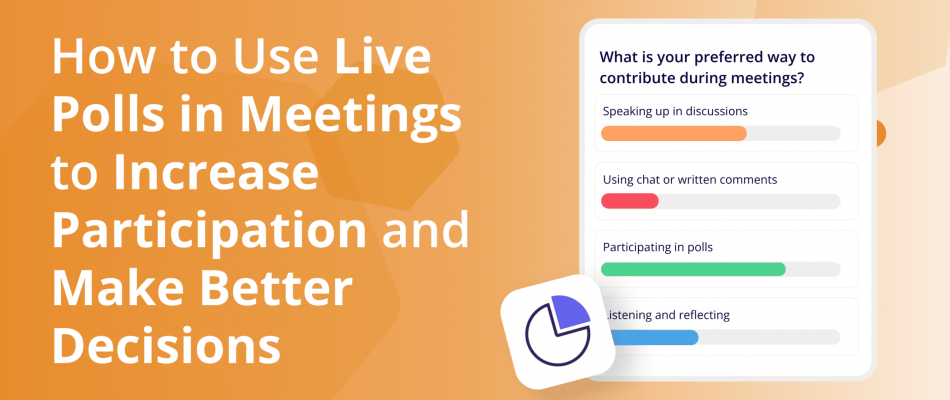
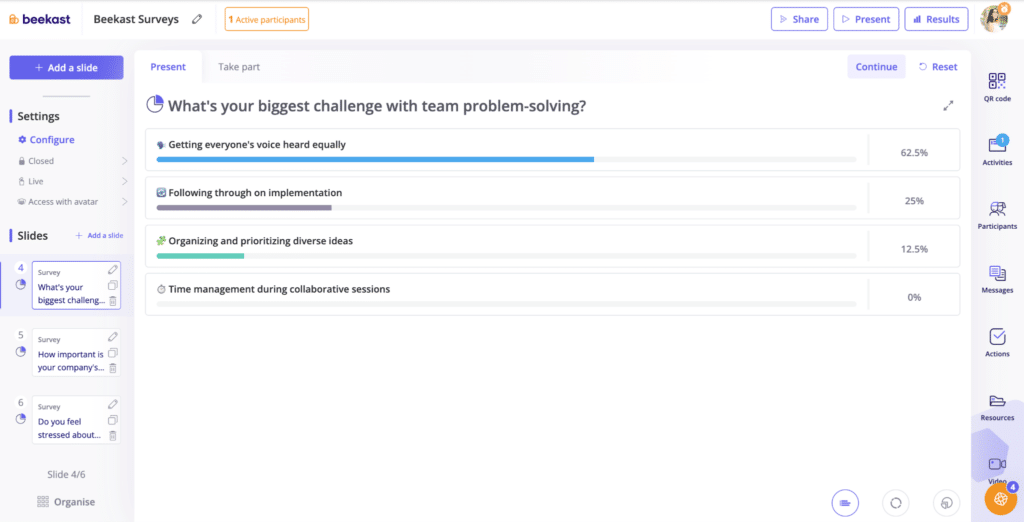
A live poll is an interactive activity that allows you to ask a question during a meeting and collect responses from participants in real-time. Everyone votes from their device, and the results appear instantly on the screen — often as bar charts, percentages, or visual summaries.
Live polls make it easy to gauge opinions, check understanding, or make quick decisions without having to call on individuals or slow down the conversation. For example, during a meeting, you might ask your team, “Which topic should we focus on next?”
Participants vote on their devices, and within seconds, the top choice is displayed on the screen. It’s a fast, inclusive way to guide the direction of your meeting without debates or guesswork.
What are the Benefits of Live Polls for Meetings?
Using live polls for your meetings will:
1. Increase Participation Instantly
Interactive meeting polls give everyone an equal voice in the room. Instead of relying on the same few people who always speak up, a poll invites every participant to share their opinion with almost zero effort. Even those who are quiet, hesitant, or unsure about speaking in front of others can participate with a single tap on their phone or laptop.
Because the input is quick and often anonymous, people feel more comfortable contributing honestly. This creates a more balanced discussion and ensures you’re hearing from the whole group, and not just the most vocal personalities. In seconds, you move from passive listeners to an engaged audience that’s actively shaping the conversation.
2. Make Decision-Making Faster and Fairer
Live voting tools are used to help you make decisions quickly, as everyone can vote simultaneously. You don’t have to wait for people to speak up or sit through lengthy discussions.
They also make decisions fairer because everyone gets one equal vote — no one can talk over others or push their opinion harder. And since voting is usually anonymous, people answer honestly.
3. Guide the Conversation With Data
Live polls give you real-time data that helps you decide what to talk about next. Instead of guessing what the group needs or hoping people speak up, the poll results tell you directly.
If most people vote for a specific topic, you know that’s where their interest or concern is. If the majority chooses one solution over another, you have a clear direction to explore. And if a large number of participants say they’re confused, you know it’s time to slow down and clarify before moving on.
This turns the meeting into a more focused and relevant discussion. You’re using actual data from your audience to guide the conversation and make sure their needs are being addressed.
How to Use Beekast Live Polls
Beekast’s meeting engagement tool makes it easy to add live polls to your meetings and collect instant feedback from participants. Here is how to set up live polls and surveys in Beekast.
1. Sign up for a free Beekast account

2. Once logged into Beekast Sessions, click on “Survey” on your dashboard.

3. Set up the activity. Add your questions, select the chart type, and specify how you want the results to be presented.

4. Launch your Kanban activity and wait for the results to roll in.
Live Poll Use Cases for Meetings and Training
Live polls are flexible enough to fit into almost any meeting or workshop. Here are some of the most common ways teams use them to gather input quickly and keep participants engaged.
- Team meetings: live polls help you quickly gauge the group’s sentiment. You can use them to choose which topics to cover first, check alignment on priorities, or gather honest feedback without putting anyone on the spot. It keeps the meeting moving and ensures everyone’s voice is heard, even in a busy agenda.
- Team workshops and training sessions: in training environments, polls are great for checking understanding or measuring confidence levels. A quick question, such as “How comfortable are you with this concept?” can instantly reveal whether to move forward or spend more time on a topic. They also break up long sessions and keep participants active.
- Project kickoffs: use polls to collect early input on goals, risks, or expectations. For example, you can ask the team which tasks feel most urgent or which challenges they expect to face. This helps the group start with clarity and shared priorities, rather than relying on assumptions.
- Large group meetings or all-hands: when you have a big audience, open discussion isn’t always possible. Live polls let you get feedback from everyone at once, making the meeting feel inclusive even if hundreds of people are present. It’s a simple way to keep the crowd engaged and gather real data fast.
- Brainstorming sessions: after generating ideas, a live poll is the easiest way to narrow them down. Participants vote on their favorite options, and you instantly see which ideas have the most support. It turns brainstorming into action and helps the group move forward with confidence.
5 Common Mistakes to Avoid with Love Polls
Live polls can energize a meeting and surface real-time insight, but poorly designed ones do more harm than good. Here are the five most important mistakes to avoid:
1. Asking Questions the Audience Can’t Meaningfully Answer
If participants don’t have enough context, expertise, or information to respond honestly, you’ll collect confident-looking data that means nothing. Polls work best when the question is within the lived experience of the room. Don’t poll people on things they’re guessing at.
2. Using Too Many Options
A poll with eight answer choices creates analysis paralysis and splits responses so thinly that no pattern emerges. Stick to two to four options. If the question genuinely requires more, it’s probably two questions, not one.
3. Revealing Results Before Everyone has Voted
As soon as results appear on screen, they influence remaining voters. People conform, second-guess themselves, or disengage entirely because they assume the outcome is settled. Keep results hidden until the poll closes.
4. Collecting Responses Without Doing Anything with Them
Running a poll and then moving on without acknowledging the results is one of the fastest ways to lose an audience. People voted — they want to know what it means. Even a brief reaction (“Interesting — more of you than I expected said X”) closes the loop and makes participation feel worthwhile.
5. Treating the Poll as the Insight Rather than the Starting Point
A live poll tells you what people think right now, in this room, with this framing. That’s useful but limited. The real value is in the follow-up: why did people answer this way, does it match reality, and what should change because of it? Without that conversation, the poll is just a number on a slide.
Ready to Start Using Beekast Live Polls in Your Meetings?
If you want meetings that are more interactive, inclusive, and easier to run, live polls are an easy win. They increase engagement, take the pressure off participants, give everyone an equal voice, and help you understand exactly what your group is thinking in real time.
Instead of guessing what people need or hoping someone will speak up, you receive clear signals that guide the conversation. With Beekast, setting up real-time polling activities takes just a few seconds. That way, you can focus on leading a meaningful and engaging meeting, rather than juggling tools or managing the room.
Try the Live Poll activity in Beekast for free.
Live Polls FAQs
If you’re new to using live polls in your meetings, here are some quick answers to the most common questions to help you get started and make the most of them in Beekast.
1. What is a Live Poll and How Does It Work?
A live poll is an interactive question you ask during a meeting that participants answer in real time from their phones or laptops. As soon as people vote, the results appear instantly on the screen, usually as bars, percentages, or simple charts.
2. How Do You Use Live Polls in a Meeting?
With Beekast, you can use live polls in a meeting by asking a question and inviting participants to vote from their devices. As responses come in, the results update instantly on the screen, giving you a quick read of the group’s opinions or understanding.
3. How Do I Create a Live Poll in Beekast?
To create a live poll in Beekast, start by opening your session and selecting the Live Poll activity from the activity list. You can then choose the type of poll you want to run—such as multiple-choice, rating scale, yes/no, or word selection and customize your question and answer options.
Once your poll is ready, share the session link or code with participants so they can vote from their phone or laptop. As soon as they start responding, Beekast displays the results in real time, making it easy to guide the conversation or make quick decisions based on the group’s input.
4. Do Live Polls Work in Remote or Hybrid Meetings?
Yes. Live polls work exceptionally well in remote and hybrid meetings, such as strategy meetings and training sessions. Participants vote from their own devices, so everyone can engage equally whether they’re in the room, joining from home, or dialing in from another location.
In Beekast, responses update instantly on the shared screen, so the entire group sees the results at the same time. This helps create a more interactive and inclusive experience, even when people aren’t physically together.
5. Which Tools Can I Use to Run Live Polls During Meetings?
There are several tools you can use to run live polls, but the best option depends on the type of meeting you’re running and how interactive you want it to be. Beekast is one of the easiest choices because it lets you create live polls directly in your meeting. Participants vote from their device, and the results appear instantly on the screen.
6. How Do I Ensure Anonymous Polling in Beekast
To keep polls anonymous in Beekast, you need to avoid collecting or linking participant identities to responses.
Here’s how to do that:
- Allow guest access so participants don’t need to log in
- Don’t require names or emails when joining the session
- Disable participant tracking in session settings
- Use standard poll activities (MCQs, ratings, word clouds) without assigning responses to individuals
- When exporting results, choose aggregated data only