Kanban boards in meetings are one of the simplest ways to bring structure, clarity, and momentum to conversations. Instead of long discussions and scattered notes, you get a visual workflow that keeps everyone aligned and focused on what matters. In this guide, you’ll learn how to use Kanban boards to run more organized, action-oriented meetings, and how Beekast makes it easy to turn ideas into real progress.
What is a Kanban Board?
A Kanban board is a visual workflow tool that helps teams organize tasks, track progress, and see who’s working on what at a glance. It’s typically divided into columns, for example, To Do, In Progress, and Done, so you can easily follow how work moves through each stage.
Originally created for lean manufacturing, Kanban boards are now widely used in meetings, team workshops, and team collaboration because they make priorities visible, reduce confusion, and keep everyone aligned.

What Are the Benefits of Kanban Boards for Meetings?
Using Kanban boards in meetings will:
1. Bring Structure to the Conversation
As a workshop facilitation tool, Kanban boards provide a visual agenda for your meeting. Instead of people bringing up random topics or jumping ahead, the board shows exactly what needs to be discussed and in what order.
For example, if your board has columns like To Discuss → In Progress → Done, you naturally talk through items from left to right. Everyone can see what’s next, what’s being worked on, and what’s already decided, so the conversation stays organized and on track.
Why does this matter? Meetings rely on good conversations to solve problems, share information, and make decisions. But without structure, conversations can easily get messy:
- People talk over each other.
- Topics get mixed up or forgotten.
- Time gets wasted.
A Kanban board prevents chaos by acting like a guide. It keeps the discussion focused, shows where the team stands in the process, and ensures that nothing important is overlooked.
2. Make Priorities Clear
In meetings, teams often waste time debating what to discuss. A Kanban board solves this by placing the most important items right in front of you, so everyone knows exactly where to start. Instead of looking at a long list of tasks and guessing which ones are important, the board shows you:
- What needs to be discussed first?
- What people are already working on.
- What’s already finished.
Because everything is organized visually, you can instantly tell which tasks are urgent, which ones can wait, and which ones should be the focus of the meeting.
3. Reduce Meeting Follow-Up Work
A Kanban board helps you capture decisions and next steps during the meeting, so there’s less work to do afterward. Instead of taking separate notes, rewriting tasks, or sending lengthy recap emails, everything is already organized on the board in real-time.
As people talk, you can add cards, assign owners, update statuses, or move tasks into the “Done” column. By the time the meeting ends, the follow-up work is mostly complete, as the board already reflects the decisions made.
How to Use Beekast Kanban Boards
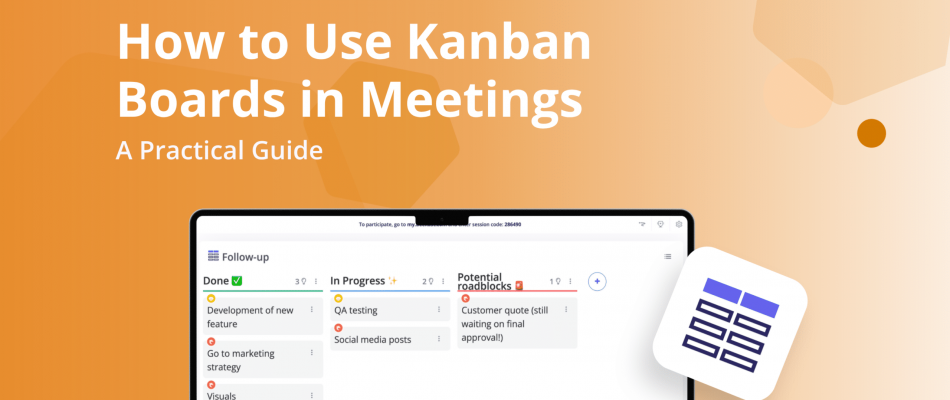
Beekast is an interactive meeting software that offers various training activities. The Kanban Board is one of them, allowing you to bring structure into your discussions. Instead of relying on static slides or scattered notes, you can add a Kanban Board activity directly to your session and collaborate with participants in real time.
1. Sign up for a free Beekast account

2. Once logged into Beekast Sessions, click on “Board” on your dashboard.

3. Set up the activity. Add instructions, categories, and specify the activity format.

4. Launch your Kanban activity and wait for the results to roll in.
Kanban Board Use Cases for Meetings and Training
Kanban boards are incredibly flexible, making them useful in a wide range of meetings and team workshops. Here are some of the most common ways teams use them to stay organized, aligned, and action-focused.
- Team meetings: use the board to organize talking points, track ongoing work, and keep everyone aligned on what needs attention. It helps prevent scattered discussions and keeps the meeting focused.
- Project kickoff sessions: map out tasks, responsibilities, and timelines so the whole team starts on the same page. A Kanban board gives everyone a clear view of what’s ahead and who’s doing what.
- Retrospectives or sprint reviews: sort what went well, what didn’t, and what actions to take next. The visual layout makes it easier to spot patterns, prioritize fixes, and turn insights into concrete next steps.
- Brainstorming workshops: capture ideas as cards, group similar ones together, and move the best ones forward. Kanban boards foster brainstorming that remains structured without stifling creativity.
- Training sessions and workshops: use the board to guide activities, show progress through exercises, or break down complex concepts into steps. It helps participants stay oriented and engaged throughout the session.
Common Mistakes to Avoid when Using Kanban in Meetings
Using Kanban in meetings can be powerful, but only if it’s used properly. Here are the top 5 most important mistakes to avoid when using Kanban in meetings:
1. Treating the Board as a Status Report, not a Conversation Tool
If the meeting becomes a tour of the board — “this is done, this is in progress, this is blocked” — you’ve turned Kanban into a passive update mechanism. The board should provoke discussion, not replace it. Focus time on what’s stuck, what’s at risk, and what needs a decision, not on reading cards aloud.
2. Updating the Board During the Meeting
Live editing while people are talking splits attention and stalls momentum. Cards should be moved and updated before the meeting, so the board reflects reality when everyone sits down. The meeting is for thinking, not data entry.
3. Ignoring WIP Limits
Work-in-progress limits exist to expose overload and force prioritization. If your team routinely blows past them without discussion, the limits are decorative. When a column is over its limit, that’s the most important thing to talk about in the meeting — not something to scroll past.
4. Including Everyone for Every Column
Not every card is relevant to every person in the room. When the whole team sits through updates on work that doesn’t involve them, attention drifts and meetings run long. Structure the conversation so people engage deeply with what concerns them and step back when it doesn’t.
5. Never Revisiting the Board Structure Itself
A Kanban board that made sense three months ago may no longer reflect how work actually flows. If columns are always empty or always overflowing, if cards routinely skip stages, the board needs redesigning. Build in a periodic review — separate from the operational meeting — to ask whether the board still serves the team.
Start Using Kanban Boards in Your Meetings with Beekast
Kanban boards are one of the easiest ways to bring clarity, structure, and momentum to your meetings. With just a few clicks, you can add a Kanban activity in Beekast, organize your topics visually, and collaborate with participants in real time.
Whether you’re running a project kickoff, a retrospective, or a brainstorming session, Kanban boards help you turn conversations into clear next steps and shared ownership. Try it in your next meeting and see how much smoother and more productive your sessions can be.
Try the Kanban Board interactive activity in Beekast for free.
Kanban Boards FAQs
If you’re new to using Kanban boards in meetings, you probably have a few questions about how they work and when to use them. Here are some quick answers to help you get started and make the most of them in Beekast.
1. What is a Kanban Board and How Does It Work?
A Kanban board is a workshop facilitation tool that helps teams organize tasks and track progress. It typically uses columns such as “To Do,” “In Progress,” and “Done” to indicate the current status of each item.
In practice, you add tasks or ideas as cards and move them across the board as the discussion evolves. This makes it easy for everyone to see what needs attention, what the team is currently working on, and what has already been completed. It keeps the meeting focused, structured, and action-oriented.
2. How Do You Use the Beekast Kanban Board in a Meeting?
You use Beekast’s Kanban board in a meeting by organizing discussion topics or tasks into columns, typically labeled as “To Discuss,” “In Progress,” and “Done.” As the meeting progresses, you add cards for each idea or task and move them across the board based on the team’s decisions.
Participants can contribute their own cards, vote on priorities, or help move items, making the meeting more collaborative and inclusive. By the end, the board clearly shows what was covered, what still needs work, and who is responsible for the next steps. It’s a simple way to keep conversations focused and turn decisions into clear actions.
3. How Do I Create a Kanban Board in Beekast?
To create a Kanban board in Beekast, start by opening your session and adding the Kanban activity from the activity list. From there, you can customize your columns, such as “To Discuss,” “In Progress,” and “Done.” Add cards for topics, tasks, or ideas you want to cover.
Once the board is set up, share your session link or code with participants so they can join, add their own cards, and collaborate in real time. Beekast updates the board in real time as items move across columns, making your meeting more structured and action-focused.
4. Can I Use Kanban Boards for Brainstorming Sessions?
Yes. The Beekast Kanban Board activity works extremely well for collaborative brainstorming sessions. You can use the board to capture ideas as cards, group similar ones together, and move the strongest or most relevant ideas into a separate column for deeper discussion.
This structure helps you avoid idea overload, keeps the session organized, and makes it easy for participants to see how their contributions fit into the bigger picture. It also naturally transitions from brainstorming into prioritization and action planning.
5. What Types of Meetings Work Best With Kanban Boards?
Any meeting that involves planning, decision-making, or tracking progress benefits from the clear structure a Kanban board provides.
- Team meetings: to organize talking points and track ongoing work.
- Project kickoffs: to outline tasks, owners, and timelines.
- Retrospectives or sprint reviews: to sort wins, challenges, and next steps.
- Brainstorming sessions: to capture, group, and prioritize ideas.
- Training workshops: to guide participants through exercises or steps.