
Creating a training session rarely starts with a complete blank. You usually already have something — a learning objective, an old slide deck, a document, a few rough notes, or simply a clear idea of what participants need to walk away knowing.
The challenge is turning that material into a session that actually works. You still need to decide what to cover, how to structure the flow, where participants should get involved, which activities make sense, and how much time to spend on each section. Then you have to build it all.
Pollen Create is designed to take on much of that preparation work. Built directly into Beekast, Pollen Create is an AI training copilot that helps you plan, build, and refine interactive training sessions. Give it your objective, audience, timing, and instructions, and it can turn those inputs into a structured session that you can continue adapting before you deliver it.
Pollen Create doesn’t replace your expertise as the trainer or make every decision for you. It’s your copilot, taking on the first-draft work of structuring the session, choosing relevant activities, and turning your ideas into something you can build on.
TL;DR: Pollen Create Explained
- Pollen Create is Beekast’s AI training copilot, built specifically to help trainers plan, build, and improve interactive sessions. It works inside Beekast, so it can create and edit supported activities directly instead of only suggesting what you should build.
- Pollen Create is different from general-purpose AI assistants like ChatGPT or Claude because it works directly inside Beekast. It can use the session context and create or edit supported Beekast activities rather than only suggesting what you could build.
- Pollen Create can produce a first draft of your training session in under a minute, giving you a starting point that you can continue refining before delivery.
What Is Pollen Create?
Pollen Create is an AI training copilot built into Beekast that helps trainers turn a learning objective or rough idea into a structured, interactive session. It can plan the session flow, create supported Beekast activities, and help refine the session through conversation while the trainer remains in control.
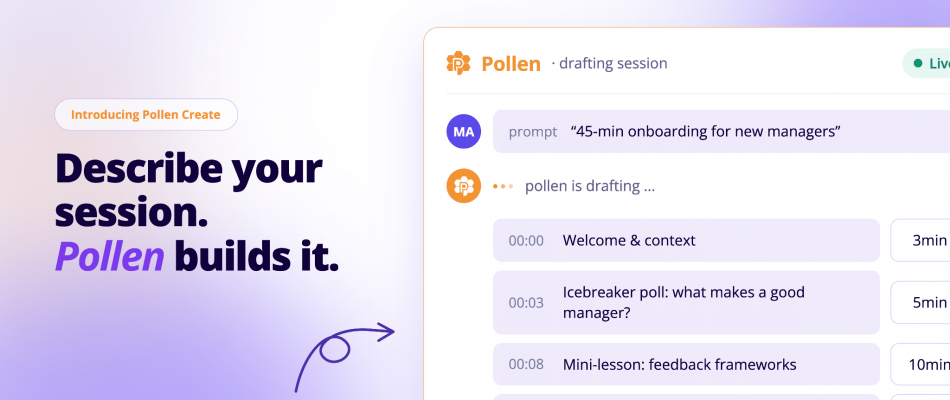
Instead of starting with an empty session and building everything manually, you tell Pollen Create what you want to achieve. For example, you might ask it to create a 45-minute onboarding session for new managers, explain who will be attending, and specify that you want the session to be highly interactive.
Pollen uses that context to help structure the session, suggest suitable Beekast training activities, and create the supported elements needed for the flow. You can then keep refining it in a conversational way. You can shorten a section, replace an activity, make the session more participatory, or adapt it for a different audience.
You still make the final decisions. Pollen gives you a strong starting point, but as the expert, you remain responsible for the content, the fit for your audience, and how the session is ultimately delivered.
How Does Pollen Create Work?
Using Pollen Create starts much like briefing a colleague on the training you need to prepare. You explain what you are trying to achieve, review the approach it proposes, and then work with it to build and refine the session in Beekast.
Before you start: Pollen Create can modify or overwrite slides in your session, and there is currently no way to undo those changes. Duplicate your session first, so you have a backup to return to if needed.
Step 1: Describe the Training You Need to Prepare
Start by giving Pollen the context it needs to understand the session. That can include who the training is for, what you want participants to learn or be able to do, how much time you have, and any constraints or requirements it should take into account.
For example: “Create a 60-minute training session for first-time managers on giving constructive feedback. The group has little management experience, and I want the session to be highly participative.”
You do not need to arrive with a finished agenda. Pollen can use the brief to start shaping the session with you.
Step 2: Review the Session Plan
If the session requires several interactive activities, Pollen can propose a plan before it starts creating them. This gives you an opportunity to check the overall direction first. You can adjust the emphasis, encourage more participation, adjust the timing, or rethink an activity before moving on to the build.
Step 3: Build the Session with Pollen Create
Once you are happy with the direction, Pollen can start creating the supported interactive activities and other session elements in Beekast. It works through the session, element by element, using Beekast’s supported activity catalog and the plan you have agreed on.
You can review what it creates as the session takes shape, rather than manually recreating an AI-generated plan in Beekast. Pollen Create explains its choices, too. It can justify each decision so you understand “why this activity instead of another.”
Step 4: Refine what Pollen Creates
Training preparation rarely ends with the first version of an activity. You can continue the conversation with Pollen Create as you review the session. Ask it to change an activity, rethink part of the flow, shorten something, or adapt the session based on what you think will work better for your participants.
Pollen Create uses the current session as context, so the refinement occurs within the session you are already building rather than starting from scratch.
Step 5: Review the Session before Training Delivery
The final review still belongs to you. Check that the content is accurate, the activities suit your audience, the timing is realistic, and the overall session reflects how you want to facilitate it. Pollen Create helps with the preparation and iteration, but you remain responsible for the session you ultimately deliver.
Pollen Create vs. General-Purpose AI Assistants: What’s the Difference?
If you can plan your training session using AI assistants like ChatGPT and Claude, why do you still need Pollen Create? Good question.
ChatGPT can help you design a training session. Pollen Create is built into the environment where that session is actually created, so it can turn the plan into a working interactive session and keep refining it with you. In other words, Pollen Create removes the handoff between AI-assisted planning and actual session creation.
Here are a few more advantages of using Pollen Create in Beekast for your training session, compared to an LLM.
- Less translation work: With ChatGPT, you get recommendations or a plan, then you still have to recreate that plan in Beekast. Pollen Create can create and edit supported activities in the session itself.
- It has the actual session context: Pollen Create can work from the audience, objective, constraints, and current state of the Beekast session instead of relying on you to repeatedly describe what already exists.
- The workflow is continuous: You can plan, build, change, and refine the same session rather than bouncing between an AI chat and a separate training platform.
- Pollen Create can improve the session you’ve already built: General AI assistants can suggest new ideas, but Pollen Create can work with the Beekast session you already have and help you change specific parts of it.
For example, say you have an onboarding session that works well, but you do not want to use the same icebreaker every time. You can ask Pollen Create to replace just that activity with a fresh alternative, without rebuilding the rest of the session.
- Pollen Create remembers how you like to work: It keeps track of the session you’re building and, when memory is enabled, can remember preferences from previous work. That means you don’t necessarily have to re-explain how you like to structure or facilitate a training session every time.
- Pollen Create knows which Beekast activity to use — and when: If you ask a general-purpose AI assistant for an engaging exercise, it might suggest a poll, quiz, breakout, role-play, or something your training platform doesn’t even support. Pollen Create works with the interactive activities available in Beekast, so it can recommend the right format for the learning goal and add it directly to the session.
Don’t just take our word for it. Here’s what one of our users says about using Pollen Create for training prep.
“Pollen Create is a genuinely useful feature. The suggestions are relevant, it saves time, and it improves the quality of the activities.”
What Can You Use Pollen Create For?
Pollen Create supports different kinds of training, workshops, and coaching sessions. Sometimes that means planning from scratch. Other times, it means choosing a better activity, improving a session you already have, or simply getting a second opinion on how the training is designed.
1. Employee Onboarding
Give Pollen the audience, learning goal, session length, and any onboarding requirements, and it can turn that brief into a structured session with the right mix of explanation and participation. For example, instead of covering company values in three presentation slides, Pollen might suggest a reflection prompt, a discussion activity, or a quick knowledge check that gets new hires actively engaging with the material.
If you already have an onboarding session in Beekast, you can use Pollen to improve specific sections instead of rebuilding the whole thing. You might ask it to make the first 15 minutes more participative, replace a weak activity, tighten an overlong section, or add an interaction after a policy-heavy part of the session.
2. Manager Training
For manager training on topics such as giving feedback, delegation, handling conflict, or running performance conversations, Pollen can help turn abstract principles into scenarios managers can actually work through.
For example, if you are building a session on giving feedback, ask Pollen whether the flow provides participants with enough opportunities to practice. It might suggest adding a scenario in which managers choose how they would respond, a discussion of common mistakes, or a reflection activity that helps them compare the model you are teaching with how they currently handle feedback.
You can also use Pollen to challenge the structure of an existing session: flag a section that is too theory-heavy, suggest where practice should happen earlier, or recommend a different Beekast activity if the one you chose does not fit the learning goal.
Once you decide on the approach, Pollen can create or edit the supported activities directly in the session.
3. Compliance and Process Training
If you are training employees on a new approval process, ask Pollen Create to break the workflow into clear stages, identify where people are most likely to make mistakes, and add an interactive activity at those points.
You can also use Pollen to review an existing session and tighten specific sections. If a policy explanation runs too long, it can suggest where to simplify, where to add a check for understanding, or where a different Beekast activity would make the point more clearly.
For compliance-sensitive topics, the trainer should still verify the factual content before delivery.
4. Workshops and Internal Training
If you are running a strategy workshop, ask Pollen Create to structure the session so the group first surfaces ideas, then discusses them, then narrows them down to a smaller set of priorities. Pollen Create can suggest suitable Beekast activities for each stage and create the supported activities directly in the session.
It can also help improve workshops you already use. If the discussion tends to stall after a certain section, or if one activity draws low participation, you can ask Pollen Create to suggest a different format, adjust the sequence, or make that part of the session more interactive.
5. Coaching Sessions
If you are coaching someone on career development, ask Pollen to build a session that starts with a self-assessment, moves into a discussion of strengths and priorities, and ends with a concrete development plan. It can suggest prompts or supported Beekast activities for each stage, depending on how structured or interactive you want the session to be.
You can also use Pollen to refine a coaching format you already use. If the conversation tends to stay too abstract, for instance, you could ask it to add more reflection, introduce a prioritization exercise, or create a stronger close that turns the discussion into clear next steps.
Who is Pollen Create Built For?
Pollen Create is built for people who design and deliver interactive training, workshops, and learning sessions in Beekast.
That includes:
- L&D teams creating onboarding, manager training, compliance programs, and other repeatable internal learning sessions.
- Professional trainers and facilitators who regularly adapt sessions for different clients, audiences, and learning objectives.
- HR and People teams running employee onboarding, policy training, manager development, and internal workshops.
- Sales enablement and customer education teams building product training, sales training, certification sessions, and customer onboarding.
- Subject-matter experts and internal trainers who know the material they need to teach but want help turning it into a structured, interactive session.
Pollen can also support experienced trainers who already have a strong methodology. In that case, it can be used to pressure-test a session, improve a specific section, choose a more suitable Beekast activity, or reduce the manual work involved in building and updating sessions.
What Are the Limitations of Pollen Create?
Pollen Create can take a lot of the work out of planning and building a training session, but there are a few boundaries worth knowing.
1. It Does Not Run the Training for You
Pollen Create is designed to help you prepare the session, not replace you as the facilitator. It can plan the flow, create activities, and help you refine the session, but you still lead the training and respond to participants in the moment. Once the session is underway, Beekast handles the interactive experience and collects participant responses, scores, and engagement data that you can review afterward.
2. The Trainer Still Makes the Final Call
Pollen can suggest structures, activities, and improvements, but it does not replace trainer judgment. You should still review the content, check that the activities suit your audience, and make sure the final session reflects how you want to facilitate it.
3. It Does Not Browse the Web for Current Information
Pollen works with the information you give it and the context of the session you are building. If your training depends on up-to-date regulations, company policies, statistics, or other external information, you should provide that material or verify the facts yourself before delivery.
Try Pollen Create in Your Next Beekast Session
The easiest way to understand Pollen Create is to use it on a real interactive training session.
Open Beekast, give Pollen the training you need to prepare, and see what it comes back with. You can keep what works, change what doesn’t, and refine the session from there. If you already have a session in progress, you can use Pollen there too.
What is Pollen Create FAQs
Got more questions about using the Beekast Pollen Create tool for interactive coaching or training? You’d find some helpful answers below.
1. Does Pollen Create Replace the Trainer?
No. Pollen Create is designed to support the trainer, not replace them. It can help plan the session, suggest and create activities, and refine the flow, but the trainer still decides what is appropriate for the audience, checks the content, and leads the session.
2. How Long Does it take for Pollen Create to build a Training Session in Beekast?
Pollen Create can draft an interactive training session in Beekast in under a minute. That gives you a first version of the session, including the proposed structure and supported interactive activities. From there, you can review the result, change activities, adjust the timing, or keep refining the session with Pollen.
How long the full preparation takes will depend on the complexity of the training and how much you want to customize before delivery.
3. What is the Difference between Pollen and Pollen Create?
Pollen is Beekast’s umbrella brand for its AI capabilities. Pollen Create is the Pollen product designed specifically to help you plan training sessions, create interactive Beekast activities, and refine the session as you build it. Other Pollen capabilities can do different jobs. Pollen Focus, for example, helps analyze responses collected through Beekast’s Word Cloud activity.
4. What Can Pollen Create Actually Do?
Pollen Create can help with the main parts of preparing a training session in Beekast. You can use it to:
- Plan the session: Give it your objective, audience, duration, and constraints, and it can propose a structure and sequence of activities.
- Create Beekast activities: It can add and edit supported interactive training activities directly in your Beekast session.
- Improve an existing session: Ask it to rethink a section, replace an activity, adjust the flow, or make part of the session more interactive.
- Help you choose activities: If you know what you want participants to do but not which Beekast activity fits, Pollen can suggest an appropriate option.
- Talk through the training design: You can ask why it chose a particular activity or structure and use it as a sounding board while you refine the session.
5. What is an AI Training Copilot?
An AI training copilot is an AI tool designed to work alongside trainers or L&D professionals as they create, improve, or deliver training. It supports the training professional rather than replacing them: the AI helps with the work, while the trainer remains responsible for the decisions and final result. Pollen Create by Beekast is an example of an AI training copilot.


